


Weather
4.458.00 Reviews
App Specs
- Version
- 1.7.1
- Updated On
- License
- Free
- Downloads
- 1,000,000+
- Developer
- Coocent
- Categories
- Weather
- Platform
- Android, iOS
Screenshots
 Analysis by AppCompare
Weather decisions are rarely about the sky alone. I want to know whether a dry morning will turn wet on the way home, or whether a storm alert is worth changing my plans for. Weather, the weather app from Coocent, brings forecasts, radar maps, widgets and alerts together in one place. That mix makes it useful for quick checks, though I’d still treat any forecast as guidance rather than a guarantee.
A practical everyday forecast
The app is free to install, with optional in-app purchases ranging from $0.99 to $59.99 per item. Its current version is 1.7.1, and it runs on Android 7.0 or later. The experience is aimed at a broad audience: the content rating is Everyone, and the app has reached over one million installs. Its average rating is 4.5 from around eight thousand ratings, a healthy sign of interest, though ratings alone can’t tell me whether a forecast will fit my location or routine.
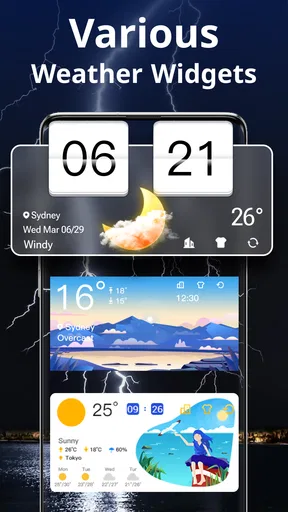
For a typical weekday, I’d use it in two passes: check the forecast before leaving, then look again if the sky changes or an alert arrives. A forecast is most helpful when it informs a decision—whether to carry a raincoat, move a walk earlier, or leave extra time for a weather-sensitive trip. The radar view adds a visual way to think about nearby conditions, while the widget can make a glance-check easier without opening the full app.
What the radar and alerts add
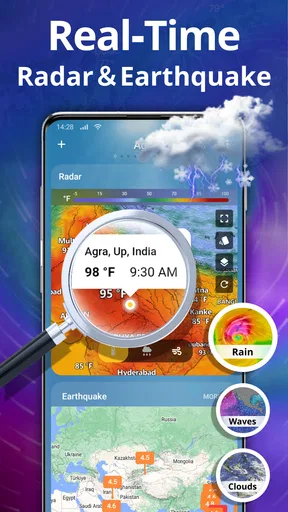
Weather radar is most useful when I’m trying to judge the direction and apparent movement of rain, not when I’m looking for certainty down to the minute. I’d use it before an outdoor errand or while deciding whether a short walk can wait. Storm alerts serve a different purpose: they can bring important weather information to my attention without requiring me to remember to check the forecast. I’d keep alerts enabled if timely warnings matter to my plans, but I’d avoid treating a notification as a substitute for local safety guidance during dangerous conditions.
A useful habit is to compare the broad forecast with the immediate radar picture. A day can look generally clear while a passing shower still affects a particular part of the afternoon. Conversely, a patch of rain on a map doesn’t necessarily mean it will reach my exact spot. Checking both views helps me make a more grounded decision than relying on a single icon or headline.
Who will get the most from it
I think this app suits people who want a straightforward daily forecast with a few practical extras, especially anyone who likes seeing weather visually or wants a widget and storm alerts alongside regular forecast information. It can also help when I’m keeping an eye on more than one place, such as home and a destination I expect to visit. That’s a convenient way to prepare without jumping between separate weather services.
On the other hand, people who need highly specialized forecasting for aviation, mountain travel, marine conditions, or professional outdoor work should look for a service built specifically around those decisions. A general weather app can be a useful first check, but specialist tools and official local warnings are better suited to high-consequence situations. I’d also skip this one if I only want a bare temperature display and have no interest in radar, widgets, or alerts; a simpler phone weather view may be quicker.
Worth Reading Before You Choose

EA SPORTS FC Mobile 26 Is a Bigger Football Game, but It Takes Time

Flipboard Shows What News Apps Must Do Beyond the Feed

Switching to Android Auto Means Rethinking Your Driving Routine

Google Calendar Makes a Crowded Week Easier to Manage

Ludo King Makes the Most of the Minutes Between Plans

Baby Panda World Brings Quick Play to Modern Phones, but Its Game Library Feels Busy
How it fits among weather apps
Compared with the built-in weather app on a phone, Weather’s appeal is the combination of radar maps, a weather information widget, and storm alerts in one dedicated app. That makes it worth trying if the default option feels too limited or if I prefer a separate place to check conditions. The trade-off is that another app means another interface to learn and another source of notifications to manage. If a phone’s built-in forecast already answers my daily questions, switching may not add enough value.
It also differs from services focused on dense charts or specialist observations: Weather is better approached as an accessible everyday dashboard, not a technical forecasting workstation. Before relying on it for a trip, I’d check the destination as well as home and revisit the forecast close to departure. Forecasts can change, and a map or alert is only useful when I interpret it in context rather than assuming it guarantees a particular outcome.
First Impressions
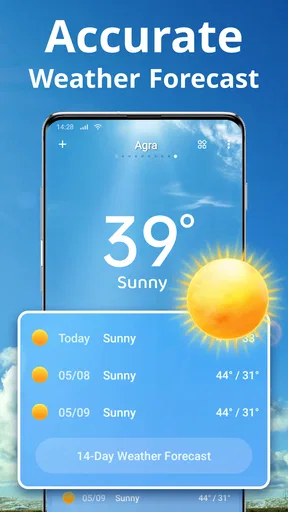
From the moment I downloaded Weather, I was impressed by its sleek and intuitive interface. It’s like the app designers knew exactly what I wanted—a clutter-free experience with no unnecessary frills. The app opens up to a clear display of the current temperature, weather conditions, and a neat little icon that tells you whether to grab those shades or keep the umbrella handy.
Features That Stand Out
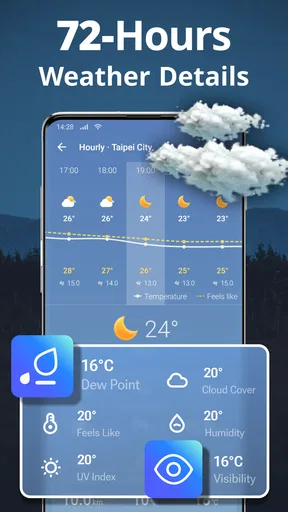
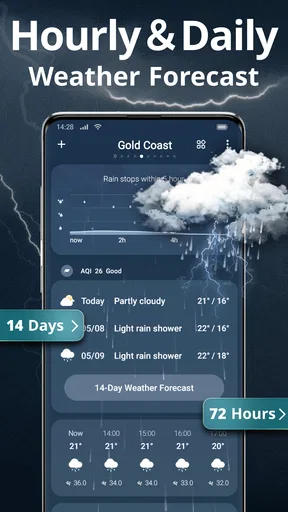
Now, let’s talk features. One of the coolest things about Weather is its hourly forecast. I mean, who doesn’t love knowing exactly when that midday sun will peak or when the evening chill will set in? It's perfect for planning activities, whether you're hitting the beach or just stepping out for a quick errand.
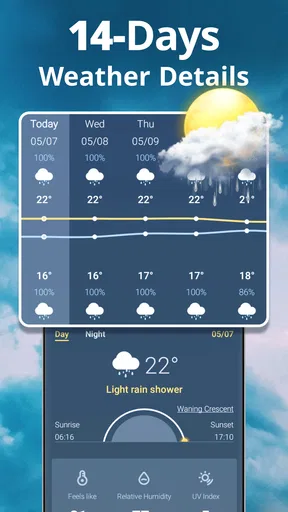
Another feature I found super handy is the 7-day forecast. It’s like having a personal meteorologist in your pocket. You get a detailed view of the week ahead, so you can plan out your wardrobe, outdoor activities, or even your grocery shopping list if you’re avoiding those rainy days.
User Experience
What really makes Weather stand out is its seamless user experience. Navigating through the app is a breeze—pun intended. The tabs are well-organized, and the transition between them is smooth. Plus, the app is incredibly responsive, which is a big win for someone like me who's always in a hurry.
And let’s not forget about the notifications. I love that I can customize alerts for specific weather conditions. It’s like having a heads-up before the storm hits, literally. Whether it’s a sudden drop in temperature or an unexpected shower, I appreciate the heads-up from my trusty app.
Accuracy of Information
We all know that accuracy is everything when it comes to weather apps. Thankfully, Weather delivers precise and timely updates. I found it to be spot-on with its predictions, which is crucial for someone who relies on accurate forecasts for their daily commute and weekend plans.
Customization and Personal Touch
For those who like a personal touch, Weather allows for some neat customization options. You can set up multiple locations, which is perfect if you’re someone who travels frequently or just wants to keep tabs on the weather in different places. Plus, you can adjust the app’s appearance to match your style, whether you prefer a bright and colorful layout or something more subdued.
Another cool feature is the ability to switch between different units of measurement. Whether you’re a Celsius devotee or a Fahrenheit fan, Weather has got you covered.
Using it without over-relying on it
There’s a small but useful distinction between checking a forecast and making a plan around it. For an ordinary commute, I’d use the hourly view to spot a likely change in conditions, then decide whether carrying an umbrella is an easy precaution. For a long outdoor event, I’d check the forecast again nearer the start rather than treating a week-ahead outlook as fixed. That workflow is more dependable than making one early check and assuming the weather will follow it exactly.
The widget is most valuable when I want a quick glance, not when I need the detail behind a changing forecast. I’d use it as a prompt to open the app when conditions look uncertain, rather than expecting a small home-screen panel to replace radar or a closer look at alerts. Keeping the widget focused on a place I actually care about also makes it more useful than filling the app with locations I rarely check.
What to consider before relying on it
The app’s broader feature set is a plus, but each extra surface—forecast, radar, widget, and notifications—can create a little more to manage. I’d start with the location and units I use every day, then add alerts only for conditions that would genuinely change my plans. That keeps the experience useful instead of turning a weather check into a stream of interruptions. If I’m traveling, I’d add the destination temporarily and remove it when it stops being relevant.
One question people often have is whether a free app means every option is free. Here, optional purchases are available, so I’d look at the in-app purchase details before buying anything and decide whether an extra is something I’ll actually use. The basic appeal is the convenient everyday combination; anyone who wants only a simple forecast can first compare that experience with the weather information already available on their phone.
Another practical question is how much to trust a storm notification. I’d treat it as a prompt to check the situation and follow appropriate local instructions, not as a complete account of risk. Likewise, a forecast that looks clear shouldn’t override what I can see outside, especially if conditions are changing quickly. This cautious approach doesn’t make the app less useful; it makes its information easier to apply sensibly.
Product changes and the current version
Weather was released on November 29, 2021, and its current version is 1.7.1. Those details give the app some history and show the version currently offered, but they don’t by themselves tell me which features changed between releases or how a particular update affects an existing setup. I wouldn’t infer a redesign or a new forecasting capability from a version number alone.
For someone already using the app, the sensible approach is to check the version shown on their device and review any update notes presented through the app marketplace before changing a routine. If a widget or alert behaves differently after an update, I’d first revisit its location and notification settings rather than assume the forecast itself has changed. For someone considering an install, the current version is a useful reference point, while expectations about future features should remain just that: expectations.
Final Thoughts
In a world where the weather can change at the drop of a hat, having a reliable app like Weather on your phone is essential. It’s user-friendly, accurate, and packed with features that cater to both casual users and weather enthusiasts alike. Whether you’re planning a picnic or prepping for a big trip, this app is your go-to for all things weather-related.
So, next time you’re wondering if you should carry that extra layer or if it’s safe to leave the umbrella at home, just check Weather. It’s like having a friend who’s always in the know about what’s happening in the skies above.
Pros
- Accurate and up-to-date forecasts.
- Elegant and user-friendly interface.
- Customizable weather alerts.
- Detailed weather maps and radar.
- Supports multiple locations.
Cons
- Occasional ads can be intrusive.
- Some features require premium subscription.
- Limited offline functionality.
- Battery consumption can be high.
- Data usage can be significant.
FAQs for Weather
What features does the Weather app offer?
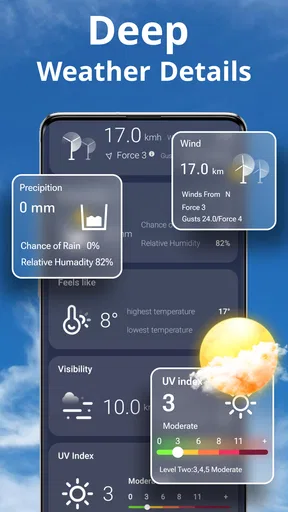
The Weather app provides real-time weather updates, hourly and weekly forecasts, severe weather alerts, and interactive radar maps. Users can also access detailed weather data like humidity, wind speed, and UV index. Additionally, the app offers personalized notifications and widgets for quick access to weather information.
Is the Weather app free to use?
The Weather app is free to download and use, offering basic features without any cost. However, there may be in-app purchases for advanced features such as ad-free experiences, premium widgets, or detailed weather analytics. Users can choose whether or not to upgrade based on their needs.
How accurate is the Weather app's forecast?
The Weather app uses data from reliable meteorological sources and employs advanced algorithms to ensure accurate forecasts. While no weather app can guarantee 100% accuracy due to the unpredictable nature of weather, it generally provides highly reliable information that is updated regularly to reflect current conditions.
Does the Weather app drain battery quickly?
The Weather app is optimized for performance, minimizing battery usage while providing timely updates. Features like background data refresh and location services can impact battery life, but users can customize settings to manage power consumption effectively. It's designed to balance functionality with battery efficiency.
Can I use the Weather app offline?
The Weather app requires an internet connection to provide real-time updates and accurate forecasts. However, it can display previously loaded data when offline. For the most accurate and up-to-date information, it's recommended to use the app with an active internet connection.


